
华为 BFD 验证实验
拓扑
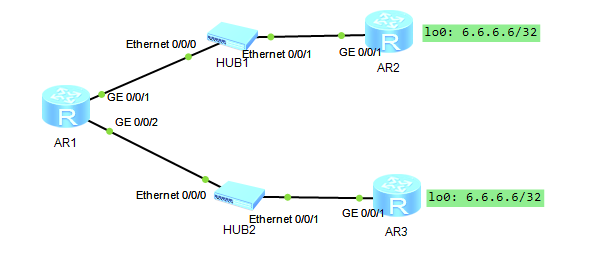
此处所有 AR 均为 AR2200
配置
IP 规划 & 配置
AR1 ~ AR2 = 12.0.0.0/24
AR3 ~ AR3 = 13.0.0.0/24
省略配置过程
配置路由
[AR1]ip route-static 6.6.6.6 255.255.255.255 12.0.0.2
[AR1]ip route-static 6.6.6.6 255.255.255.255 12.0.0.3 preference 100
这时候把 AR2 G0/0/1 DOWN 掉,preference 100 的路由不会生效,
因为 AR 1 G0/0/1 还是 Up 状态,这时候无法与 6.6.6.6 连通。
这种情况下 需要利用 bfd 或 nqa 探测,确保浮动路由正常工作
配置 BFD
[AR1]bfd		# 启用 bfd
[AR1-bfd]quit

[AR1]bfd test bind peer-ip 12.0.0.2 interface GigabitEthernet 0/0/1 one-arm-echo	# 创建会话 test,从G 0/0/1 单向检测 12.0.0.2
[AR1-bfd-session-test]discriminator local 1		# 本地标识符,单向检测中无意义
[AR1-bfd-session-test]min-echo-rx-interval 100	# 每 100ms 检测一次
[AR1-bfd-session-test]commit	# 提交会话配置

[AR1]dis bfd session all
--------------------------------------------------------------------------------
Local Remote     PeerIpAddr      State     Type        InterfaceName
--------------------------------------------------------------------------------

1     -          12.0.0.2        Up        S_IP_IF     GigabitEthernet0/0/1
--------------------------------------------------------------------------------
     Total UP/DOWN Session Number : 1/0

[AR1]ip route-static 6.6.6.6 32 12.0.0.2 track bfd-session test
这时候再把 AR2 G0/0/1 DOWN 掉,preference 100 的路由自动生效
[AR1]dis bfd session all
--------------------------------------------------------------------------------
Local Remote     PeerIpAddr      State     Type        InterfaceName
--------------------------------------------------------------------------------

1     -          12.0.0.2        Down      S_IP_IF     GigabitEthernet0/0/1
--------------------------------------------------------------------------------
     Total UP/DOWN Session Number : 0/1

[AR1]dis ip routing-table 6.6.6.6
Route Flags: R - relay, D - download to fib
------------------------------------------------------------------------------
Routing Table : Public
Summary Count : 1
Destination/Mask    Proto   Pre  Cost      Flags NextHop         Interface

        6.6.6.6/32  Static  100  0          RD   12.0.0.3        GigabitEthernet0/0/1
配置汇总
AR1
<AR1>dis current-configuration
[V200R003C00]
#
 sysname AR1
#
 snmp-agent local-engineid 800007DB03000000000000
 snmp-agent
#
 clock timezone China-Standard-Time minus 08:00:00
#
portal local-server load portalpage.zip
#
 drop illegal-mac alarm
#
 set cpu-usage threshold 80 restore 75
#
bfd
#
aaa
 authentication-scheme default
 authorization-scheme default
 accounting-scheme default
 domain default
 domain default_admin
 local-user admin password cipher %$%$K8m.Nt84DZ}e#<0`8bmE3Uw}%$%$
 local-user admin service-type http
#
firewall zone Local
 priority 15
#
interface GigabitEthernet0/0/0
#
interface GigabitEthernet0/0/1
 ip address 12.0.0.1 255.255.255.0
#
interface GigabitEthernet0/0/2
 ip address 13.0.0.1 255.255.255.0
#
interface NULL0
#
bfd test bind peer-ip 12.0.0.2 interface GigabitEthernet0/0/1 one-arm-echo
 discriminator local 1
 min-echo-rx-interval 100
 commit
#
ip route-static 6.6.6.6 255.255.255.255 12.0.0.2 track bfd-session test
ip route-static 6.6.6.6 255.255.255.255 12.0.0.3 preference 100
#
user-interface con 0
 authentication-mode password
user-interface vty 0 4
user-interface vty 16 20
#
wlan ac
#
return
AR2
<AR2>dis cur
[V200R003C00]
#
 sysname AR2
#
 snmp-agent local-engineid 800007DB03000000000000
 snmp-agent
#
 clock timezone China-Standard-Time minus 08:00:00
#
portal local-server load portalpage.zip
#
 drop illegal-mac alarm
#
 set cpu-usage threshold 80 restore 75
#
aaa
 authentication-scheme default
 authorization-scheme default
 accounting-scheme default
 domain default
 domain default_admin
 local-user admin password cipher %$%$K8m.Nt84DZ}e#<0`8bmE3Uw}%$%$
 local-user admin service-type http
#
firewall zone Local
 priority 15
#
interface GigabitEthernet0/0/0
#
interface GigabitEthernet0/0/1
 shutdown
 ip address 12.0.0.2 255.255.255.0
#
interface GigabitEthernet0/0/2
#
interface NULL0
#
interface LoopBack0
 ip address 6.6.6.6 255.255.255.255
#
user-interface con 0
 authentication-mode password
user-interface vty 0 4
user-interface vty 16 20
#
wlan ac
#
return
AR3
<AR3>dis cur
[V200R003C00]
#
 sysname AR3
#
 snmp-agent local-engineid 800007DB03000000000000
 snmp-agent
#
 clock timezone China-Standard-Time minus 08:00:00
#
portal local-server load portalpage.zip
#
 drop illegal-mac alarm
#
 set cpu-usage threshold 80 restore 75
#
aaa
 authentication-scheme default
 authorization-scheme default
 accounting-scheme default
 domain default
 domain default_admin
 local-user admin password cipher %$%$K8m.Nt84DZ}e#<0`8bmE3Uw}%$%$
 local-user admin service-type http
#
firewall zone Local
 priority 15
#
interface GigabitEthernet0/0/0
#
interface GigabitEthernet0/0/1
 ip address 13.0.0.3 255.255.255.0
#
interface GigabitEthernet0/0/2
#
interface NULL0
#
interface LoopBack0
 ip address 6.6.6.6 255.255.255.255
#
user-interface con 0
 authentication-mode password
user-interface vty 0 4
user-interface vty 16 20
#
wlan ac
#
return
附录
BFD vs NQA
| 特性 | BFD | NQA |
|---|---|---|
| 核心目标 | 快速检测链路 / 邻居故障 | 全面分析网络性能与质量 |
| 检测周期 | 10ms-1s(可配置) | 秒级或自定义(如 500ms) |
| 支持协议 | 独立协议,与路由协议松耦合 | 支持 ICMP、TCP、UDP、DNS、HTTP 等多种协议 |
| 多跳支持 | 有限(需设备支持) | 原生支持 |
| 资源消耗 | 低(仅发送小尺寸 Hello 报文) | 中高(需生成测试流量,占用带宽和 CPU) |
| 典型配置 | interface Ethernet0/0 bfd interval 50 min_rx 50 multiplier 3 | ip sla 1 icmp-echo 1.1.1.1 schedule start-time now |
| 联动对象 | OSPF、BGP、VRRP 等协议 | ACL、QoS、SNMP、SD-WAN 等 |
此案例情况下,通常使用 bfd 更适合