
ENSP 链接到物理机网卡
网络桥接
- 创建简单拓扑举例
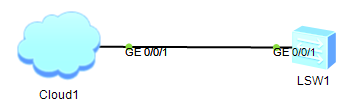
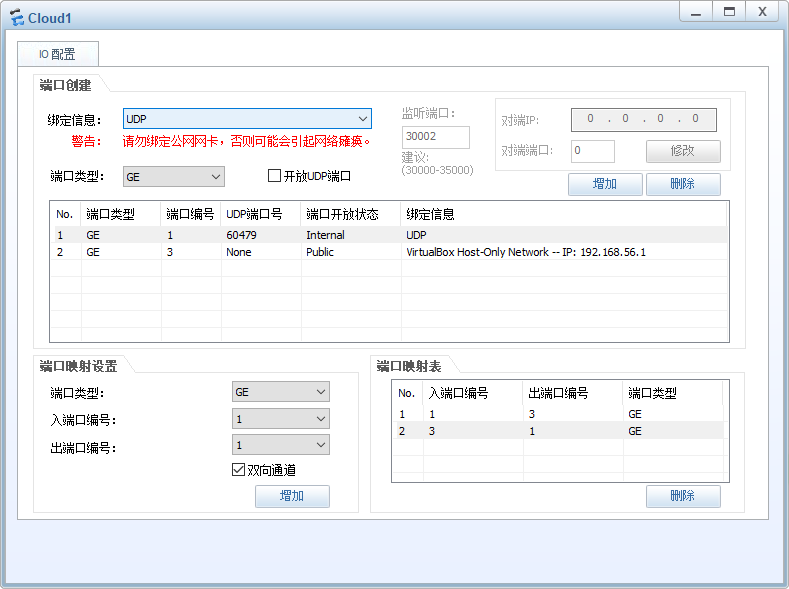
- Cloud1 创建两个接口,并添加双向端口映射
如果配置 VirtualBox 虚拟网卡不通,可尝试使用 VMware 虚拟网卡。
- 交换机 LSW1 配置举例
<Huawei>system-view
Enter system view, return user view with Ctrl+Z.
[Huawei]vlan 56

[Huawei]int Vlanif 56
[Huawei-Vlanif56]ip address 192.168.56.123 255.255.255.0
[Huawei-Vlanif56]dis this
#
interface Vlanif56
 ip address 192.168.56.123 255.255.255.0
#
return

[Huawei-Vlanif56]int g0/0/1
[Huawei-GigabitEthernet0/0/1]port link-type access
[Huawei-GigabitEthernet0/0/1]port default vlan 56
[Huawei-GigabitEthernet0/0/1]dis this
#
interface GigabitEthernet0/0/1
 port link-type access
 port default vlan 56
#
return
- 双向验证
<Huawei>ping 192.168.56.1
  PING 192.168.56.1: 56  data bytes, press CTRL_C to break
    Reply from 192.168.56.1: bytes=56 Sequence=1 ttl=128 time=30 ms
    Reply from 192.168.56.1: bytes=56 Sequence=2 ttl=128 time=30 ms
    Reply from 192.168.56.1: bytes=56 Sequence=3 ttl=128 time=30 ms
    Reply from 192.168.56.1: bytes=56 Sequence=4 ttl=128 time=40 ms
    Reply from 192.168.56.1: bytes=56 Sequence=5 ttl=128 time=20 ms

  --- 192.168.56.1 ping statistics ---
    5 packet(s) transmitted
    5 packet(s) received
    0.00% packet loss
    round-trip min/avg/max = 20/30/40 ms
C:\Users\everyone>ping 192.168.56.123

正在 Ping 192.168.56.123 具有 32 字节的数据:
来自 192.168.56.123 的回复: 字节=32 时间=17ms TTL=255
来自 192.168.56.123 的回复: 字节=32 时间=17ms TTL=255
来自 192.168.56.123 的回复: 字节=32 时间=1ms TTL=255
来自 192.168.56.123 的回复: 字节=32 时间=17ms TTL=255

192.168.56.123 的 Ping 统计信息:
    数据包: 已发送 = 4,已接收 = 4,丢失 = 0 (0% 丢失),
往返行程的估计时间(以毫秒为单位):
    最短 = 1ms,最长 = 17ms,平均 = 13ms