VLAN 间路由
VLAN 间路由
拓扑
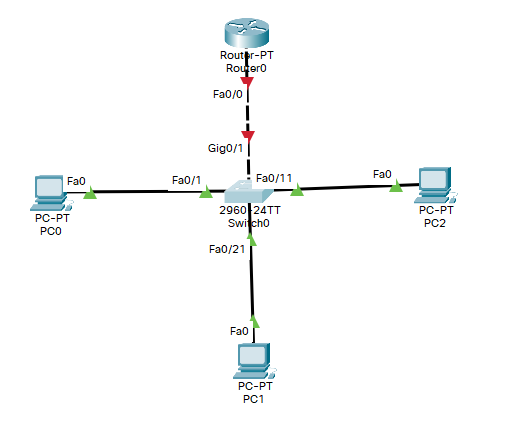
配置交换机
创建VLAN
Switch>en
Switch#conf t
Enter configuration commands, one per line.  End with CNTL/Z.
Switch(config)#host S0
S0(config)#VLAN 10
S0(config-vlan)#name Finance
S0(config-vlan)#VLAN 20
S0(config-vlan)#name Development
S0(config-vlan)#VLAN 30
S0(config-vlan)#name Management
S0(config-vlan)#exit
划分VLAN
S0(config)#int range f0/1-10
S0(config-if-range)#switchport mode access
S0(config-if-range)#switchport access VLAN 10
S0(config-if-range)#int range f0/11-20
S0(config-if-range)#switchport mode access
S0(config-if-range)#switchport access VLAN 20
S0(config-if-range)#int range f0/21-24
S0(config-if-range)#switchport mode access
S0(config-if-range)#switchport access VLAN 30
S0(config-if-range)#end
S0#
%SYS-5-CONFIG_I: Configured from console by console
设置与路由连线的接口为trunk
S0(config)#int g0/1
S0(config-if)#switchport mode trunk
查看VLAN信息
S0#show vlan

VLAN Name                             Status    Ports
---- -------------------------------- --------- -------------------------------
1    default                          active    Gig0/1, Gig0/2
10   Finance                          active    Fa0/1, Fa0/2, Fa0/3, Fa0/4
                                                Fa0/5, Fa0/6, Fa0/7, Fa0/8
                                                Fa0/9, Fa0/10
20   Development                      active    Fa0/11, Fa0/12, Fa0/13, Fa0/14
                                                Fa0/15, Fa0/16, Fa0/17, Fa0/18
                                                Fa0/19, Fa0/20
30   Management                       active    Fa0/21, Fa0/22, Fa0/23, Fa0/24
1002 fddi-default                     active
1003 token-ring-default               active
1004 fddinet-default                  active
1005 trnet-default                    active

VLAN Type  SAID       MTU   Parent RingNo BridgeNo Stp  BrdgMode Trans1 Trans2
---- ----- ---------- ----- ------ ------ -------- ---- -------- ------ ------
1    enet  100001     1500  -      -      -        -    -        0      0
10   enet  100010     1500  -      -      -        -    -        0      0
20   enet  100020     1500  -      -      -        -    -        0      0
30   enet  100030     1500  -      -      -        -    -        0      0
1002 fddi  101002     1500  -      -      -        -    -        0      0
1003 tr    101003     1500  -      -      -        -    -        0      0
1004 fdnet 101004     1500  -      -      -        ieee -        0      0
1005 trnet 101005     1500  -      -      -        ibm  -        0      0

VLAN Type  SAID       MTU   Parent RingNo BridgeNo Stp  BrdgMode Trans1 Trans2
---- ----- ---------- ----- ------ ------ -------- ---- -------- ------ ------

Remote SPAN VLANs
------------------------------------------------------------------------------

Primary Secondary Type              Ports
------- --------- ----------------- ------------------------------------------
配置路由器
启用 g0/0 端口
Router>en
Router#conf t
Enter configuration commands, one per line.  End with CNTL/Z.
Router(config)#host R0
R0(config)#int f0/0
R0(config-if)#no shut

R0(config-if)#
%LINK-5-CHANGED: Interface FastEthernet0/0, changed state to up

%LINEPROTO-5-UPDOWN: Line protocol on Interface FastEthernet0/0, changed state to up
回到 S0,检查Trunk状态
S0#
%LINK-5-CHANGED: Interface GigabitEthernet0/1, changed state to up

%LINEPROTO-5-UPDOWN: Line protocol on Interface GigabitEthernet0/1, changed state to up

S0#show interfaces trunk
Port        Mode         Encapsulation  Status        Native vlan
Gig0/1      on           802.1q         trunking      1

Port        Vlans allowed on trunk
Gig0/1      1-1005

Port        Vlans allowed and active in management domain
Gig0/1      1,10,20,30

Port        Vlans in spanning tree forwarding state and not pruned
Gig0/1      none
为R0子接口封装dot1q
R0(config)#interface f0/0.10
R0(config-subif)#
%LINK-5-CHANGED: Interface FastEthernet0/0.10, changed state to up

%LINEPROTO-5-UPDOWN: Line protocol on Interface FastEthernet0/0.10, changed state to up

R0(config-subif)#encapsulation dot1q 10
R0(config-subif)#ip add 10.10.10.1 255.255.255.0
R0(config-subif)#exit
R0(config)#interface f0/0.20
R0(config-subif)#
%LINK-5-CHANGED: Interface FastEthernet0/0.20, changed state to up

%LINEPROTO-5-UPDOWN: Line protocol on Interface FastEthernet0/0.20, changed state to up

R0(config-subif)#encapsulation dot1q 20
R0(config-subif)#ip add 10.10.20.1 255.255.255.0
R0(config-subif)#exit
R0(config)#interface f0/0.30
R0(config-subif)#
%LINK-5-CHANGED: Interface FastEthernet0/0.30, changed state to up

%LINEPROTO-5-UPDOWN: Line protocol on Interface FastEthernet0/0.30, changed state to up

R0(config-subif)#encapsulation dot1q 30
R0(config-subif)#ip add 10.10.30.1 255.255.255.0
R0(config-subif)#end
R0#
%SYS-5-CONFIG_I: Configured from console by console

R0#
检测
R0#show ip interface brief
Interface              IP-Address      OK? Method Status                Protocol
FastEthernet0/0        unassigned      YES unset  up                    up
FastEthernet0/0.10     10.10.10.1      YES manual up                    up
FastEthernet0/0.20     10.10.20.1      YES manual up                    up
FastEthernet0/0.30     10.10.30.1      YES manual up                    up
FastEthernet1/0        unassigned      YES unset  administratively down down
Serial2/0              unassigned      YES unset  administratively down down
Serial3/0              unassigned      YES unset  administratively down down
FastEthernet4/0        unassigned      YES unset  administratively down down
FastEthernet5/0        unassigned      YES unset  administratively down down
R0#show ip route
Codes: C - connected, S - static, I - IGRP, R - RIP, M - mobile, B - BGP
       D - EIGRP, EX - EIGRP external, O - OSPF, IA - OSPF inter area
       N1 - OSPF NSSA external type 1, N2 - OSPF NSSA external type 2
       E1 - OSPF external type 1, E2 - OSPF external type 2, E - EGP
       i - IS-IS, L1 - IS-IS level-1, L2 - IS-IS level-2, ia - IS-IS inter area
       * - candidate default, U - per-user static route, o - ODR
       P - periodic downloaded static route

Gateway of last resort is not set

     10.0.0.0/24 is subnetted, 3 subnets
C       10.10.10.0 is directly connected, FastEthernet0/0.10
C       10.10.20.0 is directly connected, FastEthernet0/0.20
C       10.10.30.0 is directly connected, FastEthernet0/0.30
配置DHCP
R0#en
R0#conf t
Enter configuration commands, one per line.  End with CNTL/Z.
R0(config)#ip dhcp pool v10
R0(dhcp-config)#network 10.10.10.0 255.255.255.0
R0(dhcp-config)#default-router 10.10.10.1
R0(dhcp-config)#exit
R0(config)#ip dhcp pool v20
R0(dhcp-config)#network 10.10.20.0 255.255.255.0
R0(dhcp-config)#default-router 10.10.20.1
R0(dhcp-config)#end
R0#
%SYS-5-CONFIG_I: Configured from console by console
测试
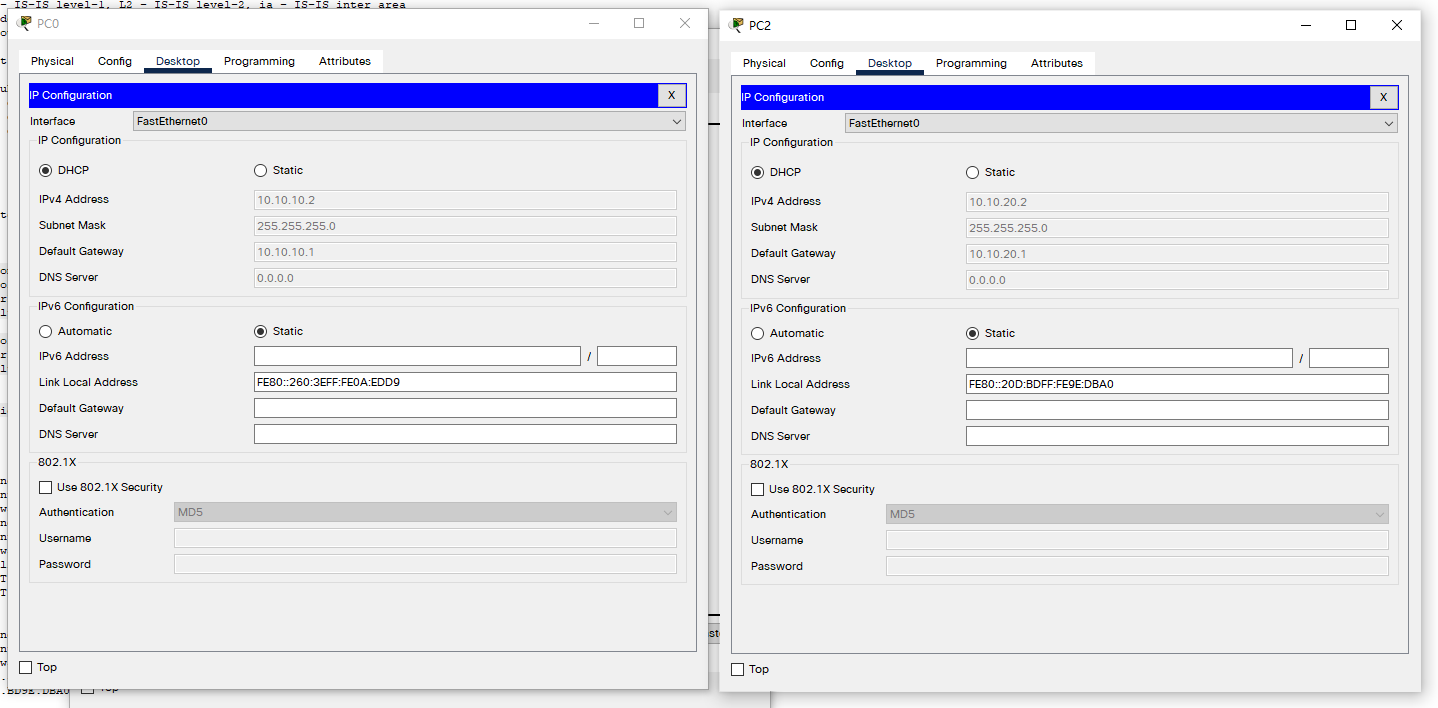
为 PC0(位于VLAN10),PC2(位于VLAN20) 启用DHCP
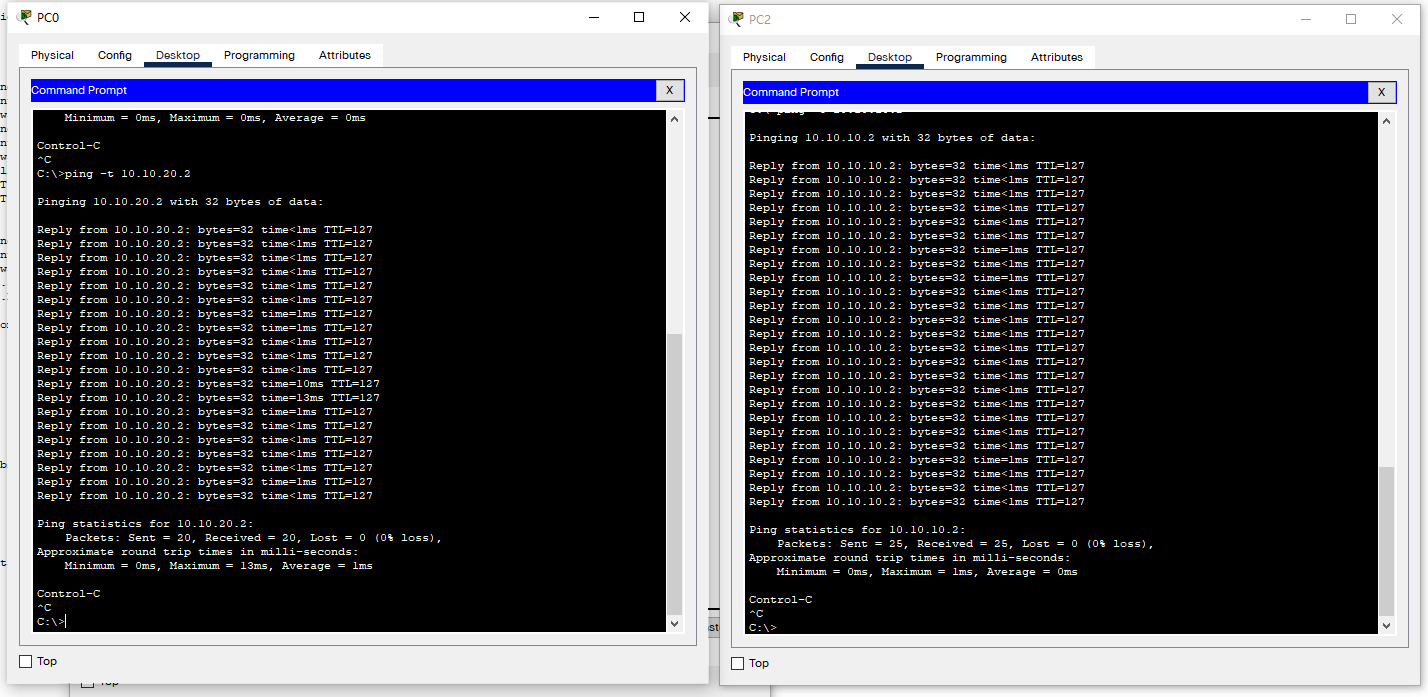
PC0, PC2互ping: